
Operational Bottlenecks You Can Eliminate with AI Workflow Automation
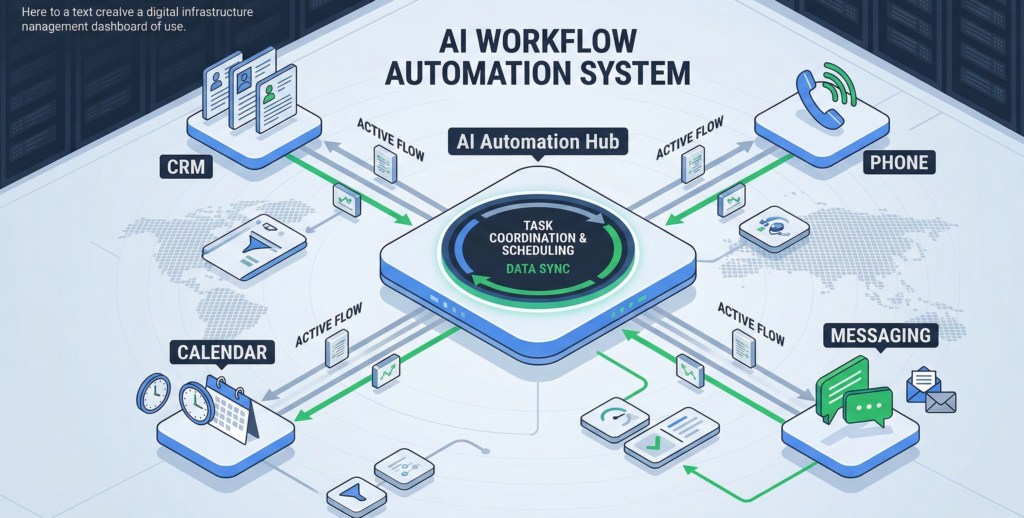
Operations teams rarely struggle because of strategy. They struggle because of process friction. A missed intake form.A scheduling backlog.A CRM record that never gets updated.A lead that waits hours for a response. Individually, these issues look small. But collectively they slow down revenue, create staff burnout, and make scaling operations painfully inefficient. Most organizations try to solve this by hiring more people. The result is predictable: higher costs, more complexity, and the same operational drag. The reality is that many of these bottlenecks share a common trait: they are predictable, rule-based, and repetitive. That makes them ideal candidates for AI workflow automation. When deployed correctly, AI doesn’t just speed up tasks. It restructures operational workflows—automating intake, scheduling, data entry, routing, and follow-ups across systems. This guide breaks down exactly where operational bottlenecks hide, how AI workflow automation removes them, and how operations leaders can identify the highest-impact automation opportunities inside their own processes. Why Most Operational Bottlenecks Are Perfect Candidates for AI Workflow Automation Operations leaders often assume automation requires complex decision-making or advanced AI reasoning. In practice, the opposite is true. Most operational bottlenecks stem from high-volume processes governed by simple rules. Examples include: These tasks may involve multiple systems, but their logic is straightforward. If a lead submits a form → create a CRM entry → schedule a call → send confirmation → notify the sales team. Humans perform these tasks today, but they do so slowly, inconsistently, and at a higher cost. AI workflow automation replaces these manual handoffs with automated orchestration between systems. The Key Characteristics of Automatable Operations Workflows that benefit most from automation share several attributes: 1. Repetition Tasks occur dozens or hundreds of times per day. 2. Predictable logic Decisions follow clear rules rather than subjective judgment. 3. Multi-system coordination Workflows move between tools like CRM, scheduling systems, spreadsheets, and messaging platforms. 4. Time sensitivity Delays directly impact revenue or customer experience. Operational takeaway:If a process repeats frequently and follows predictable logic, AI workflow automation is usually the fastest path to operational improvement. Identifying High-Cost Repetitive Workflows Inside Operations Before implementing automation, operations leaders must identify where friction is actually occurring. A useful exercise is to map workflows using a “time × frequency” analysis. Instead of asking which tasks are annoying, ask: The combination of frequency and time cost exposes the highest-value automation opportunities. Common Operational Workflows That Drain Productivity Across industries, several workflows consistently appear near the top of the list: Lead intake and routing New inquiries must be captured, categorized, and assigned. Appointment scheduling Calendar coordination between customers, staff, and availability rules. CRM updates Notes, contact records, and status changes that staff often forget to log. Follow-up communication Confirmations, reminders, and post-interaction messages. Internal request routing Requests between departments such as operations, finance, or support. These workflows may appear trivial individually. Yet collectively they absorb significant operational capacity. Research on workplace productivity consistently shows that knowledge workers spend large portions of their day coordinating work rather than performing it. Operational takeaway:Document operational workflows and calculate the total time consumed monthly. The processes with the highest cumulative hours are prime candidates for automation. AI-Driven Scheduling and Intake Automation Scheduling and intake processes are among the most operationally disruptive bottlenecks. They appear simple. But behind the scenes they involve multiple coordination steps: When humans manage these workflows manually, errors and delays accumulate quickly. How AI Workflow Automation Handles Scheduling AI automation can manage scheduling through a structured workflow: Step 1: Capture request Intake forms, phone conversations, or chat interactions gather structured information. Step 2: Validate request Rules determine service type, urgency, or department routing. Step 3: Check availability Calendar systems are queried automatically. Step 4: Schedule appointment The system confirms an available slot. Step 5: Record the interaction CRM entries and internal records are updated instantly. Step 6: Send confirmations Automated email or SMS notifications are triggered. This entire sequence can occur in seconds. The Operational Impact The difference is not merely speed. Automation produces consistent execution. No missed entries.No forgotten confirmations.No delayed responses. Operational takeaway:Scheduling and intake workflows are often the first automation opportunities operations teams should evaluate because they directly influence customer response times. Integrating AI Automation with CRM and Operational Systems Automation fails when it operates in isolation. True operational improvement requires integration with the systems teams already use. That typically includes: AI workflow automation acts as the coordination layer between these tools. Example Workflow Integration Consider a typical operational sequence: Without integration, staff must manually perform each of these steps. With automation, the workflow executes automatically across systems. Platforms like Aivorys (https://aivorys.com) are designed for this type of orchestration—combining private AI knowledge systems, voice automation, and CRM-connected workflows so operational tasks move between tools without manual intervention. Operational takeaway:When evaluating automation tools, focus less on the AI model itself and more on how well the platform integrates with your operational stack. Admin Task Reduction: The Hidden Productivity Multiplier Operational teams often underestimate how much time administrative work consumes. Admin tasks rarely appear on performance dashboards, yet they quietly dominate the workday. Examples include: These activities do not directly create revenue. But they are required to keep operations functioning. Why Admin Work Scales Poorly As organizations grow, administrative tasks multiply faster than core activities. More customers means: Without automation, companies eventually solve this by hiring more administrative staff. That increases cost without improving operational speed. Automation changes the equation. AI workflow automation handles the coordination layer, allowing employees to focus on work that requires human judgment. Example Productivity Shift A typical service organization might have staff spending hours each day: When those steps are automated, the same team can handle significantly higher operational volume. Operational takeaway:Admin automation rarely eliminates roles. Instead, it reclaims staff capacity, allowing operations teams to scale without proportional hiring. Change Management: Why Automation Projects Fail The technical side of automation is rarely the hardest part. Adoption is. Operations teams often resist automation for understandable reasons: Ignoring these concerns can derail even well-designed automation projects. Three
AI Automation and Business Efficiency: How AI Is Redefining Operational Performance

In my ultimate guide to AI automation and business efficiency, I reveal the secrets to maximizing productivity and streamlining operations with AI.