

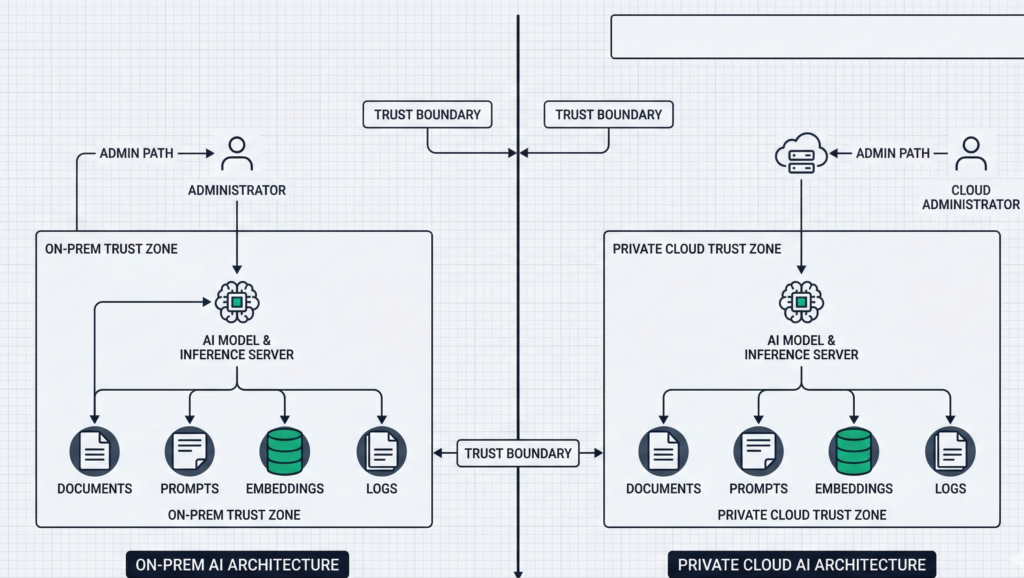
A procurement team wants “AI in 90 days.” Legal asks where prompts are stored. Security asks who can retrieve embeddings. Compliance asks for retention, audit logs, and data residency. And your infrastructure team asks the question that actually decides everything: on-premise AI vs private cloud AI — which deployment model keeps company data under control when the system is under pressure?
Most articles answer this like it’s a hosting preference. It isn’t. Deployment model changes your trust boundaries: where data can flow, who can administer it, what gets logged, and how quickly you can prove compliance when an incident or audit hits.
This guide breaks the decision down the way infrastructure teams actually evaluate it: architecture, identity and access, key management, observability, regulatory scope, operational maturity, and failure modes. You’ll get a practical rubric you can use in an internal review, plus a checklist you can hand to your security and compliance stakeholders without triggering a week of back-and-forth.
Featured Snippet Targets
Definition (40–60 words):
On-premise AI runs model serving, retrieval, and data stores inside facilities you control. Private cloud AI runs the same stack in a logically isolated environment within a cloud provider, typically with dedicated networking, private endpoints, and enterprise IAM. The security difference is defined by trust boundaries, admin access paths, and auditability—not just “where the servers sit.”
Numbered steps (40–60 words):
To choose between on-premise AI and private cloud AI:
- classify data sensitivity and regulatory scope,
- map trust boundaries (who can administer what),
- define audit evidence you must produce,
- validate network egress paths,
- model latency and availability needs,
- confirm operational capacity to patch, monitor, and respond.
Checklist (40–60 words):
If you require hard data residency, offline operation, or physical control of keys, on-premise is often favored. If you need elastic scaling, faster rollout, and standardized controls (IAM, logging, key management), private cloud often fits. When requirements conflict, hybrid deployment is usually the cleanest way to isolate regulated data while keeping agility.
H2: What “protects data” actually means in enterprise AI
When leaders ask which option “protects data,” they’re usually bundling several requirements into one word. Separate them, and the tradeoffs become concrete.
Data protection in enterprise AI typically means:
- Data confidentiality: preventing unauthorized access to prompts, documents, embeddings, call recordings, transcripts, and outputs.
- Data residency and sovereignty: ensuring data stays in specific jurisdictions, including backups and logs.
- Data minimization: limiting what the system stores, for how long, and in what form (raw text vs embeddings vs derived metadata).
- Administrative control: controlling who can alter models, prompts, retrieval sources, routing rules, and logging levels.
- Auditability: producing defensible evidence—access logs, change logs, retention policies, key usage, and incident trails.
- Resilience under failure: ensuring the system fails safely (no data spillover, no “debug logging” that captures sensitive content).
The misconception: people treat “cloud” as inherently less secure or “on-prem” as inherently safer. In practice, the riskiest systems are the ones with unclear boundaries: shared admin accounts, undocumented egress, no prompt/output logging policy, and no change control over prompts and retrieval.
Actionable takeaway: Before you compare AI deployment models, write a one-page “data protection definition” for your program: the data types involved, allowed storage forms, required logs, retention windows, and who must approve changes. If you can’t define this, no deployment model will save you.
H2: On-premise AI architecture — what you control (and what you inherit)
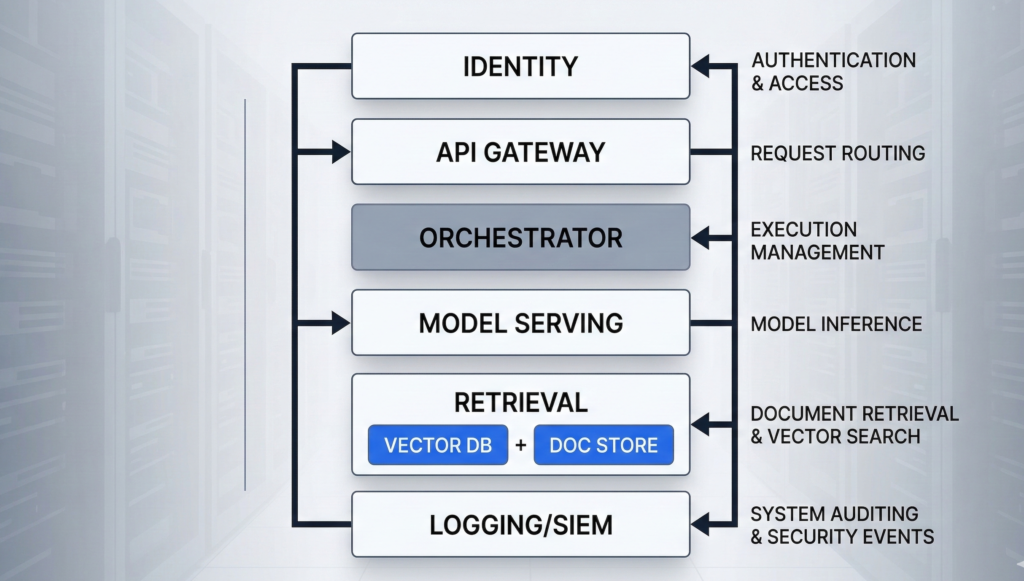
On-premise AI usually means the core components run in your own data center or dedicated facilities: model serving (GPU/CPU), retrieval (vector database + document store), orchestration, identity integration, logging, and monitoring. The real benefit is control over the full stack—especially the last mile of data handling.
What on-prem gives you:
- Physical control of infrastructure and the ability to isolate networks (including air-gapped or restricted environments).
- Tighter control of data residency because storage, backups, and log pipelines can be fully internal.
- Direct control of cryptographic key custody (HSMs, key rotation, signing processes) without relying on a cloud KMS boundary.
- Custom security posture for unusual constraints (restricted networks, specialized segmentation, non-internet environments).
What on-prem makes you responsible for:
- Patch velocity and vulnerability response across GPU drivers, orchestration layers, vector DB, API gateways, and OS images.
- Detection engineering (what gets logged, where it’s centralized, how it’s correlated, and who reviews it).
- Capacity planning for peak inference loads—especially for voice AI where concurrency spikes are common.
- Reliability engineering: failover, backups, restore tests, and supply chain controls.
The under-discussed failure mode: “on-prem” systems often drift into security debt because upgrades are hard, GPU stacks are fragile, and teams postpone patches. That creates a slow-moving risk that is easy to ignore until the first incident.
Actionable takeaway: If you choose on-prem, require an operational plan upfront: patch cadence, image hardening baseline, log retention, admin access model, and a quarterly restore test. Treat it like a product, not a server rack.
H2: Private cloud AI explained — isolation, controls, and the real trust boundary
Private cloud AI isn’t “public cloud with a nicer name.” The security posture depends on whether you’re getting a logically isolated environment with private networking, hardened IAM, and auditable controls—or simply hosting workloads in a standard tenant with better marketing language.
A strong private cloud deployment for enterprise AI commonly includes:
- Private networking: private endpoints, no public ingress, strict egress allowlists.
- Centralized identity: SSO, conditional access, MFA enforcement, role-based access control (RBAC).
- Key management: managed KMS/HSM options, rotation policies, envelope encryption, separation of duties.
- Standardized logging: consistent audit trails for identity events, admin actions, storage access, and network flows.
- Infrastructure automation: repeatable builds, policy-as-code, and predictable patch rollouts.
Where private cloud often wins: operational rigor. Many organizations can enforce least privilege, collect logs, and roll out updates faster in cloud environments because the primitives are mature and integration patterns are standardized.
Where it can lose: unclear administrative access paths. If your threat model includes powerful cloud admin roles, vendor support access, or misconfigured cross-account permissions, “private cloud” can still allow data exposure—just through different doors.
The practical framing: private cloud reduces certain risks (drift, inconsistent logging, slow patching) and increases others (control plane dependency, cloud IAM complexity). Security becomes an IAM and governance discipline problem.
Actionable takeaway: Ask one question early: “Can we prove—through logs and policy—that no human can access production prompts and retrieval data without an auditable break-glass event?” If the answer is vague, your private cloud is not yet “private” in the way compliance expects.
H2: Compliance and audit readiness — evidence beats architecture slogans
Regulated environments don’t reward good intentions. They reward evidence: documented controls, consistent enforcement, and audit trails that stand up to scrutiny.
Whether you deploy on-prem or private cloud, auditors and internal risk teams usually want proof of:
- Access control: named accounts, RBAC, MFA, just-in-time elevation, and separation of duties.
- Change management: approvals for prompt changes, routing rules, retrieval sources, and integrations.
- Data handling: classification, retention, deletion procedures, and secure backups.
- Monitoring and incident response: alerting, triage, and post-incident reporting.
- Vendor governance (if applicable): contract controls, security documentation, and audit cooperation.
Where on-prem can be stronger: when regulations or internal policy require strict data locality and you need full control over storage, backups, and log retention with no external dependency.
Where private cloud can be stronger: when your organization needs standardized evidence across environments—centralized logs, policy enforcement, and repeatable infrastructure builds that generate consistent artifacts.
Common compliance trap: teams focus on where the model runs and ignore the surrounding data flows—CRM connectors, call recordings, transcription pipelines, analytics exports, and support tooling. Most “AI data leaks” happen in the integration layer, not inside the model.
Actionable takeaway: Build your “audit evidence map” before buildout: for each control (access, change, retention, encryption), specify (1) where evidence is logged, (2) who reviews it, and (3) how long it’s retained. Choose the deployment model that makes this easiest to execute reliably.
H2: Cost, scalability, and latency — the tradeoffs that quietly change risk
Security decisions get reversed later when the system can’t meet real-world performance requirements. That’s why cost, scalability, and latency are not separate from data protection—they influence architecture decisions that determine where data ends up flowing.
Latency (especially for voice AI):
- Voice experiences are sensitive to jitter and end-to-end response time. If your voice assistant needs to pull data from internal systems and respond in near real time, network path design matters as much as model choice.
- Private cloud can reduce latency variance if you keep services co-located within a cloud region and use private endpoints.
- On-prem can win when internal systems are local and you need to avoid WAN hops entirely—especially in constrained networks.
Scalability:
- Private cloud typically offers faster elasticity for peak events (call surges, seasonal workflow spikes, batch processing).
- On-prem scaling is possible, but procurement and GPU capacity lead times make “surge capacity” expensive.
Cost:
- On-prem can be cost-stable at steady utilization, but upgrades, redundancy, and staffing costs are easy to undercount.
- Private cloud can look cheap early and expensive later if architecture allows unnecessary egress, over-logging, or uncontrolled experimentation.
The risk link: when teams can’t scale safely, they introduce shortcuts—public endpoints “temporarily,” shared admin accounts “for speed,” or exporting data to third-party tools “just to debug.” Those shortcuts become the real breach path.
Actionable takeaway: Treat performance constraints as security requirements. Document concurrency expectations, acceptable latency thresholds, and data flow boundaries under load. Then choose the deployment model that meets those requirements without “temporary” exceptions.
H2: Hybrid AI models for regulated industries — isolate what must be isolated
Many enterprise environments don’t have a single “right” answer because different data classes have different constraints. Hybrid deployment solves this by placing the strictest data inside the strictest boundary, while keeping the rest of the system operationally efficient.
A common hybrid pattern looks like this:
- On-prem for regulated data stores and retrieval sources (patient records, legal case files, financial statements, sensitive internal docs).
- Private cloud for orchestration, workflow automation, and non-sensitive workloads (ticket routing, scheduling, generalized assistance, analytics that can operate on redacted data).
- Controlled bridging layer with strict egress rules, token-based access, and auditable request/response logging policies.
Why hybrid works: it aligns “where the data lives” with “how the business needs to move.” You can keep high-sensitivity data within a hard boundary while still benefiting from cloud agility for parts of the system that don’t need that level of restriction.
The edge case to design for: prompt injection and data exfiltration attempts via the assistant. In hybrid, you must enforce policy at the boundary: what the assistant is allowed to retrieve, what it’s allowed to reveal, and when it must escalate to a human.
Platforms like Aivorys (https://aivorys.com) are built for this exact use case — private AI with controlled data handling, voice automation, and CRM-connected workflows with prompt-driven guardrails and audit-friendly behavior control.
Actionable takeaway: If your organization is debating on-prem vs private cloud because different stakeholders are “right” for different reasons, stop forcing a single answer. Define data classes, then design a hybrid boundary where the strictest class never crosses into lower-trust environments.
H2: The CIO/CTO decision rubric — choose based on sensitivity, scope, maturity
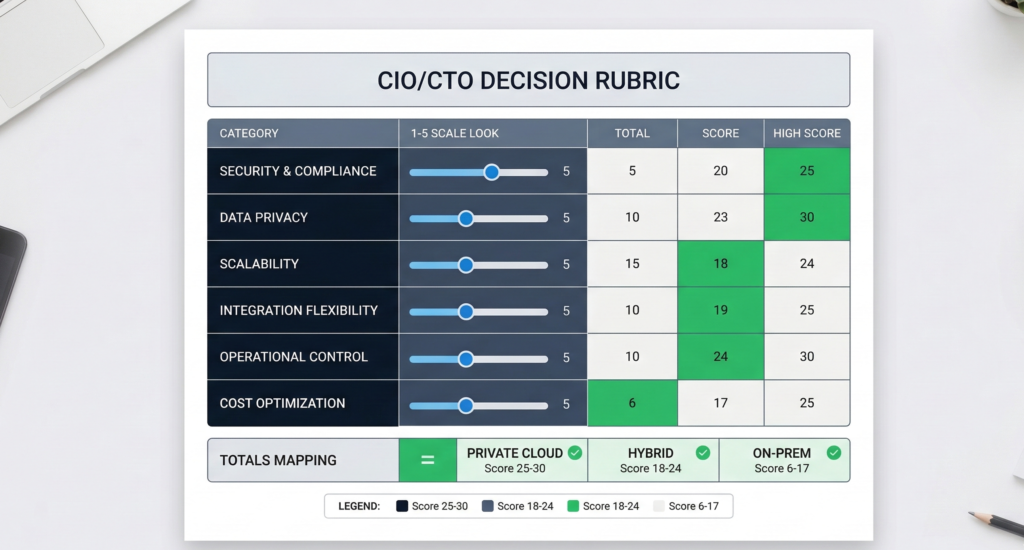
Below is a practical scoring rubric you can run in a 60–90 minute architecture review. Score each category from 1 to 5 for how strongly it pushes you toward on-prem (5 = strongly on-prem, 1 = strongly private cloud). Then total the score.
Deployment Decision Rubric (1–5 each)
- Data sensitivity and harm potential
- 1–2: low sensitivity, limited harm
- 3: mixed data classes
- 4–5: highly sensitive, high harm if exposed
- Data residency and legal constraints
- 1–2: flexible residency, limited restrictions
- 3: residency preferred
- 4–5: strict residency/sovereignty requirements
- Audit evidence requirements
- 1–2: standard enterprise controls are sufficient
- 3: enhanced auditing needed
- 4–5: frequent audits, strict evidence requirements, deep change control
- Operational maturity (patching, monitoring, IR)
- 1–2: strong cloud ops practice, mature IAM and logging
- 3: mixed maturity
- 4–5: stronger in data center ops than cloud governance, limited cloud security maturity
- Performance constraints (latency, offline needs)
- 1–2: tolerant latency, online OK
- 3: mixed workloads
- 4–5: tight latency, offline/segmented networks, voice at scale
- Integration complexity and blast radius
- 1–2: few integrations, low impact
- 3: moderate integration needs
- 4–5: many high-trust integrations (CRM, billing, patient systems), high blast radius
How to interpret totals
- 6–14: Private cloud is usually the pragmatic default
- 15–22: Hybrid is often the most defensible
- 23–30: On-prem is often justified by constraints
Actionable takeaway: Bring this rubric to your next stakeholder meeting and force alignment on scores. Disagreement usually reveals the real issue—unclear data classification, missing audit expectations, or overconfidence in operational capacity.
H2: Implementation checklist — the controls that matter in either model
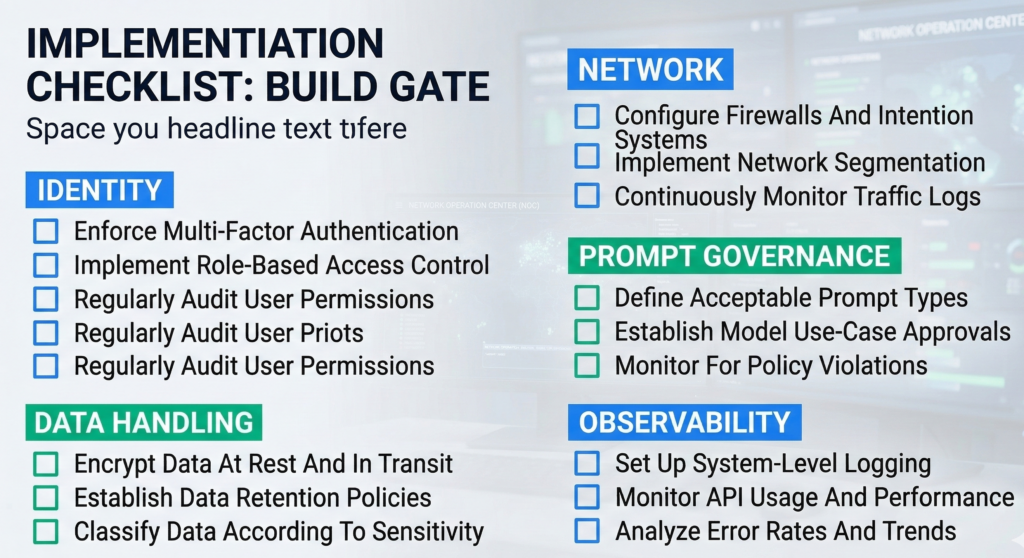
Regardless of deployment, the same control families decide whether the system is defensible. Use this checklist as a build gate before production.
Enterprise AI Data Protection Checklist
Identity and access
- RBAC mapped to job roles (not individuals)
- MFA + conditional access for all admin paths
- Just-in-time elevation and break-glass workflow
- Separate dev/stage/prod identities and keys
Data handling
- Defined data classes (raw text, embeddings, transcripts, analytics)
- Explicit retention windows per data type
- Deletion procedure tested (not just documented)
- Encryption at rest and in transit; key rotation policy
Network boundaries
- No public ingress for internal AI services unless strictly necessary
- Egress allowlists for integrations and telemetry
- Private endpoints where possible
- Clear segmentation between retrieval stores and app layer
Model and prompt governance
- Prompt/version control with approvals
- Guardrails for sensitive data disclosure
- Retrieval policy: what sources are allowed, by role and context
- Red-teaming for prompt injection and data exfil attempts
Observability and audit
- Centralized audit logs for identity, data access, and admin changes
- Alerting on anomalous access and unusual retrieval patterns
- Log retention aligned with compliance needs
- Quarterly incident simulation and evidence extraction drill
Actionable takeaway: If you can’t implement these controls with your current staffing and processes, the “safest architecture” is the one that reduces operational burden while preserving auditability. Security failures are often operational failures wearing a technical costume.
FAQ (Schema-Optimized)
What is the difference between on-premise AI and private cloud AI?
On-premise AI runs the AI stack in facilities you control—servers, networks, storage, and often the full security toolchain. Private cloud AI runs in a logically isolated cloud environment using cloud-native IAM, logging, and key management. The practical difference is the trust boundary: who can administer systems, how access is audited, and how consistently controls are enforced across environments.
Is on-premise AI always more secure for sensitive data?
Not always. On-prem can provide stronger physical control and stricter locality, but security depends on patching, monitoring, access governance, and incident response maturity. If teams can’t keep the stack current and observable, on-prem can accumulate security debt. The safer option is the one where you can enforce least privilege, minimize data retention, and produce audit evidence reliably.
Does private cloud AI meet compliance requirements like HIPAA or SOC 2?
Private cloud deployments can support regulated compliance programs when properly designed: strong IAM, documented controls, audit logging, encryption, and vendor governance where applicable. Compliance is not a hosting label—it’s a control system. You still need data classification, retention rules, access reviews, change management, and incident response processes aligned to your regulatory scope and internal risk posture.
What data should never leave on-prem environments?
Typically: data with strict residency mandates, high harm potential if exposed (certain health, legal, financial records), and data covered by internal policies requiring physical key custody or offline operation. The deciding factor is your governance requirement: if you must guarantee locality for storage, backups, and logs—and prove it—on-prem or a tightly controlled hybrid boundary is often warranted.
When is a hybrid AI deployment the right choice?
Hybrid is often right when you have mixed data classes and mixed operational needs: regulated documents that must stay inside a hard boundary, plus workflows that benefit from cloud elasticity and standardized controls. Hybrid also helps when stakeholders disagree, because it allows strict isolation for high-sensitivity data without forcing all workloads into the most restrictive environment.
How do I evaluate vendors for enterprise AI hosting?
Start with trust boundaries and evidence: admin access paths, IAM integration, audit logs, key management, retention controls, incident response commitments, and integration security. Then validate operational details: patch cadence, deployment automation, environment separation, and how guardrails are enforced for retrieval and output. Ask for concrete answers and artifacts—not general statements about security.
Conclusion
The real decision in on-premise AI vs private cloud AI isn’t philosophical, and it isn’t about which environment feels safer. It’s about which environment lets you enforce—and prove—data control under real operating conditions: changing prompts, growing integrations, shifting compliance scope, and inevitable incidents.
If your highest-risk data demands strict locality, physical key custody, or segmented networks, on-prem (or an on-prem anchor in a hybrid design) is often justified. If your biggest risk is operational drift—slow patching, inconsistent logging, weak access governance—private cloud can be the more defensible path because it standardizes control enforcement and audit evidence.
If you want a clean next step, run the rubric with your security, legal, and infrastructure leads and document the score disagreements. That meeting will surface what’s actually unclear—and what must be decided—before any architecture becomes “secure enough.”
[INTERNAL LINK: #1 — Private AI Security & Governance Checklist]
[INTERNAL LINK: #17 — AI Deployment Architecture Patterns for Regulated Teams]