
IntroductionThe Revenue You Never Saw: How Missed Calls Quietly Cost Your Business Thousands
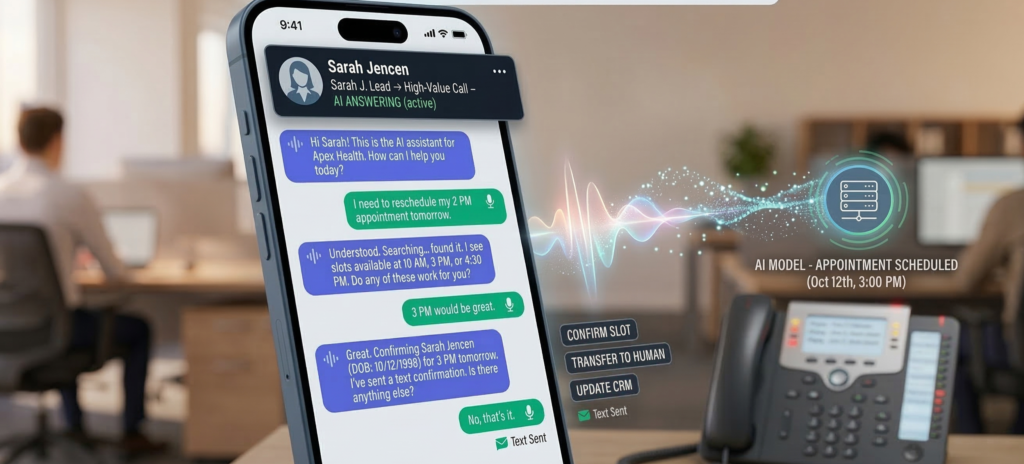
A potential customer calls your business at 7:42 PM. The office closed 40 minutes earlier. No one answers. That customer hangs up and calls the next provider. No complaint. No email. No second chance. Just lost revenue. Most small and mid-sized businesses underestimate how often this happens. Phone inquiries remain one of the highest-intent signals in sales, yet the majority of businesses still rely on human receptionists available only during office hours. The math is simple: every unanswered call represents a possible lost deal. This is where AI phone answering for business changes the equation. Modern voice AI systems can answer calls instantly, qualify leads, schedule appointments, and capture contact details—even when the office is closed. Instead of missing opportunities, businesses capture them automatically. When implemented correctly, AI call handling acts as a 24/7 front desk that never misses a lead. This article explains how AI phone answering systems capture revenue after hours, how the technology qualifies potential customers during calls, and how businesses measure the real ROI of automated call handling. The Hidden Revenue Cost of Missed Business Calls Most businesses assume missed calls are rare. In practice, they’re surprisingly common. Calls are missed when: Each missed call may represent a customer ready to buy. Why Phone Calls Represent High-Intent Leads Compared to web forms or email inquiries, phone calls usually indicate stronger purchase intent. When someone calls a business, they often want: In many industries—legal services, healthcare clinics, real estate offices, home services—a phone call often occurs at the decision stage of the buying process. If that call goes unanswered, the customer rarely waits. They call a competitor. A Simple Revenue Reality Consider a typical service business: If even two of those callers were ready to purchase, the business just lost multiple sales opportunities. Over months, that becomes a meaningful revenue gap. The issue isn’t demand. It’s availability. Key takeaway:Missed calls rarely feel dramatic, but they quietly drain revenue over time. How AI Phone Answering for Business Works Modern AI call answering systems behave much differently than traditional phone menus. Instead of rigid “press 1 for sales” systems, voice AI understands natural speech and carries on structured conversations. Core Components of AI Call Handling A typical AI phone answering system includes three layers. 1. Voice Interface Callers speak normally. The AI system converts speech into text, interprets intent, and generates responses. 2. Conversation Engine The AI follows configurable conversation flows such as: 3. Business System Integration Information captured during the call is automatically sent to internal systems such as: This means every interaction becomes usable business data. What Callers Experience From the caller’s perspective, the experience is simple. They dial the business number and hear a natural greeting such as: “Thanks for calling. How can I help you today?” From there, the AI can: Unlike voicemail, the caller receives immediate assistance. Where Businesses Deploy AI Call Handling AI answering systems are commonly used in industries where phone calls drive revenue: Key takeaway:AI call answering systems function as an always-available digital receptionist that captures opportunities instead of letting them disappear. 24/7 After-Hours Lead Capture After-hours calls represent a major blind spot for most businesses. Even companies with dedicated reception staff typically stop answering calls after closing time. That’s precisely when many potential customers begin researching services. Why After-Hours Calls Matter Customers often call outside business hours because: If the call isn’t answered, the lead disappears. Voice AI removes that limitation entirely. How AI Handles After-Hours Conversations AI answering systems can be configured to handle evening calls differently from daytime calls. For example: During office hours: After hours: This ensures the caller receives assistance even when human staff are unavailable. Why AI Outperforms Voicemail Voicemail rarely converts leads effectively. Callers often avoid leaving messages because: A conversational AI experience changes that dynamic. Instead of leaving a message, the caller completes the interaction immediately. Key takeaway:After-hours lead capture often produces some of the easiest revenue gains because it closes a gap that previously existed every night. Lead Qualification During AI Phone Conversations Capturing calls is valuable. Qualifying them is even more valuable. Businesses don’t just want inquiries—they want qualified opportunities. Voice AI systems can gather structured information during calls to determine whether a lead is worth pursuing. What AI Can Qualify During a Call Depending on the business type, AI can collect details such as: For example: A landscaping company might configure the AI to ask: These responses help staff prioritize the most promising leads. Structured Lead Data Improves Follow-Up When staff review captured leads the next day, they don’t just see a phone number. They see structured information such as: This improves response speed and relevance. The Operational Advantage Without AI, this information would only exist if someone answered the call. With AI, every caller becomes structured data inside the business workflow. Key takeaway:AI call qualification ensures captured leads are immediately actionable. CRM Auto-Entry and Workflow Automation Capturing lead information manually creates friction. Staff must listen to voicemail, transcribe notes, and enter data into CRM systems. AI eliminates that step entirely. Automatic Lead Logging When AI answers a call, the captured data can be automatically logged in systems such as: This means the lead already exists in the system before staff review it. Workflow Automation After the Call Once the call ends, automation workflows can trigger actions such as: The entire process occurs without manual intervention. Operational Example Consider a real estate brokerage. After-hours AI calls might automatically: By the time the agent logs in the next morning, the lead is already prepared for follow-up. Platforms like Aivorys (https://aivorys.com) are designed for this exact workflow—combining voice AI call handling with CRM-connected automation and structured lead capture. Key takeaway:AI call answering becomes significantly more valuable when integrated directly into the company’s operational systems. The Conversion Impact of Instant Call Response Speed matters in sales. Research and practitioner experience consistently show that faster responses dramatically increase lead conversion. The reason is simple. When someone calls a business, they are actively evaluating
AI Phone Answering That Captures Every Lead

Administrative work—not patient care—is quietly exhausting healthcare teams. Across clinics, specialty practices, and outpatient centers, administrators spend enormous amounts of time managing intake forms, appointment scheduling, phone calls, insurance verification, follow-ups, and compliance documentation. Each task is necessary. None directly improves patient outcomes. Yet together they create a heavy operational burden. The result is predictable: staff burnout, operational delays, and growing administrative costs. Healthcare leaders increasingly recognize that automation is the only scalable solution. But healthcare operates under stricter constraints than most industries. Patient data is protected by HIPAA regulations, and any technology handling that data must meet strict privacy and security standards. This creates a tension:Healthcare organizations need automation, but they cannot risk exposing patient data to insecure systems. That’s where AI for healthcare administration becomes relevant—but only when implemented with the right architecture. When properly deployed, secure AI systems can automate intake, scheduling, patient communication, and operational workflows without compromising HIPAA compliance. This article examines how healthcare organizations are using AI to reduce administrative workload safely, the technical requirements behind HIPAA-compliant AI, and the operational strategies that protect patient data while improving efficiency. The Administrative Burden in Modern Healthcare Operations Healthcare organizations often underestimate how much time administrative work consumes. Research and practitioner experience consistently show that a large portion of healthcare staff hours are spent on non-clinical work—tasks that keep operations running but rarely require human judgment. Common administrative workload sources include: Individually, each task seems manageable. But in aggregate, they create operational friction. Why Administrative Work Causes Burnout Administrative overload affects three groups simultaneously: Front desk staffConstant phone calls, scheduling changes, and form processing create cognitive overload. Healthcare administratorsOperational bottlenecks demand constant intervention and oversight. Clinical staffWhen intake or scheduling fails, clinicians absorb the consequences—delays, incomplete records, or patient frustration. The outcome is predictable: operational fatigue across the organization. Why Traditional Automation Falls Short Many healthcare organizations attempted early automation using rule-based systems or simple digital forms. These tools helped but rarely solved the deeper problem. Traditional automation struggles because healthcare workflows are unstructured. For example: A patient might call and say: “I need to schedule a follow-up with the cardiologist I saw last month, but it has to be after work hours.” This single request requires several actions: Rule-based systems fail when conversations become nuanced. AI systems handle this complexity much more effectively, especially when trained on organization-specific workflows. Key takeaway:Administrative burnout isn’t caused by a single process. It emerges from dozens of repetitive tasks that AI systems can manage reliably when implemented securely. Secure AI Patient Intake Systems Patient intake is one of the most time-consuming administrative processes in healthcare. New patients must provide: Traditional intake often involves paper forms or manual digital entry, which creates delays and transcription errors. How AI Intake Automation Works AI-powered intake systems guide patients through structured information collection while automatically validating the data. Typical capabilities include: The effect is immediate: Staff no longer need to manually review every intake form. The Security Layer That Matters In healthcare, intake systems must handle protected health information (PHI). That means the underlying architecture must meet strict privacy standards. HIPAA-aligned AI intake systems typically include: Platforms like Aivorys (https://aivorys.com) are built for environments where AI must operate on private organizational data while maintaining strict governance controls across communication channels, workflows, and automation systems. Key takeaway:AI intake systems reduce staff workload only when built on infrastructure designed for regulated healthcare data. HIPAA Architecture Requirements for Healthcare AI Not all AI tools are safe for healthcare use. Many public AI systems process user inputs on shared infrastructure. That architecture creates serious compliance risks when patient information is involved. Healthcare AI systems must follow a stricter design model. Core HIPAA Compliance Requirements for AI A compliant architecture typically includes the following components. 1. Controlled Data Processing Patient information must remain inside secure, access-restricted environments. Organizations typically deploy AI systems in: 2. Audit Logging and Traceability Every interaction involving patient data must be logged. This includes: These logs allow compliance teams to trace how patient data moved through the system. 3. Role-Based Access Controls Not every staff member should access every patient record. AI systems must integrate with identity and access management systems to enforce role-based permissions. 4. Data Retention and Governance HIPAA regulations require strict control over how long data is stored and where it resides. AI systems must support: The Most Common Compliance Mistake Healthcare organizations sometimes deploy consumer AI tools for internal tasks. Even if the tool seems harmless, entering patient data into a non-compliant system creates regulatory exposure. Key takeaway:AI adoption in healthcare must begin with architecture decisions—not automation features. AI Appointment Scheduling for Healthcare Practices Scheduling is one of the most operationally disruptive tasks in healthcare. Patients call to: Staff must handle these requests while juggling provider calendars, appointment types, insurance requirements, and patient preferences. How AI Scheduling Automation Works AI scheduling systems manage these interactions through conversational interfaces. Capabilities include: Instead of waiting on hold, patients can interact with an AI assistant that understands natural language. For example: “I need a dermatology appointment next week after 3 PM.” The system can: All without staff intervention. Operational Benefits Healthcare organizations implementing scheduling automation often see improvements in: Key takeaway:Scheduling automation doesn’t replace staff—it removes repetitive call handling so staff can focus on higher-value patient interactions. AI Patient Communication and Follow-Ups Patient communication is another administrative bottleneck. Healthcare teams must send reminders, confirm appointments, deliver preparation instructions, and follow up after visits. When these tasks are handled manually, they consume enormous time. AI Communication Automation AI systems can manage structured communication workflows automatically. Common examples include: These messages can be delivered via: Why Automation Improves Patient Experience Patients benefit when communication is consistent. Manual communication often fails because staff simply run out of time. AI systems ensure that every patient receives the right message at the right time. The result: Key takeaway:Communication automation reduces operational workload while improving patient satisfaction metrics. Risk Mitigation Strategies for Healthcare AI Healthcare leaders are right
The Psychology Behind Why Customers Trust Voice AI More Than Chatbots

A frustrated customer opens a support chat. They type a question. The chatbot replies instantly — but the answer feels scripted, mechanical, and detached from the situation. The customer rephrases the question. The bot responds again with something slightly off. Within seconds, the interaction shifts from assistance to friction. Now imagine the same customer calling a voice assistant instead. They ask the same question. The assistant responds with natural pacing, conversational tone, and the subtle rhythm of human dialogue. The experience feels different. The answer may contain the same information, but the interaction feels more trustworthy. This contrast explains why customers trust voice AI more than chatbots across many service environments. It is not only about accuracy or speed. The difference emerges from how humans process conversation psychologically. Voice carries emotional signals, conversational cues, and timing patterns that text interfaces cannot replicate. For customer experience leaders, this insight matters. Understanding the psychology of conversational interaction can determine whether automation improves service quality — or quietly erodes customer trust. The shift toward voice-based AI systems reflects a deeper principle: people evaluate technology using the same instincts they use to judge other humans. That instinct changes everything about how conversational systems should be designed. Cognitive Trust Signals Hidden Inside Voice Conversations Humans evolved to evaluate trust primarily through speech. Long before written communication existed, voice tone, cadence, and conversational rhythm served as signals of credibility and intent. Those instincts remain deeply embedded in human cognition. When customers interact with voice AI, their brains automatically evaluate several trust signals. Vocal Cadence and Natural Timing Human conversation follows predictable timing patterns. Pauses between responses signal thoughtfulness. Slight variations in speech pace indicate attentiveness. Natural transitions between phrases create conversational flow. Text-based chatbots lack these cues. Voice interfaces, however, can replicate them. Even subtle pauses can make responses feel more deliberate and authentic. Micro-insight:Trust often depends less on what is said than on how naturally it is delivered. Prosody and Emotional Interpretation Prosody refers to the rhythm, pitch, and emphasis within speech. It conveys emotional context that text cannot easily reproduce. For example: Voice AI systems designed with conversational prosody feel less robotic because they mimic human communication patterns. Conversational Turn-Taking Human dialogue follows a pattern of turn-taking. People expect slight overlaps, acknowledgments, and verbal confirmations. Voice interfaces can simulate these conversational mechanics through phrases like: These conversational markers create the illusion of attentive listening. Practical takeaway:Designing voice AI requires attention to conversational rhythm and pacing — not just language accuracy. Emotional Response: Why Tone Creates Trust Faster Than Text Trust in customer interactions is rarely logical. It is emotional first. Psychological research consistently shows that tone of voice carries emotional weight that written words cannot fully replicate. This effect is particularly visible in customer service interactions. Voice Reduces Ambiguity Text messages can easily be misinterpreted. A short chatbot response may appear dismissive, even if the intent was neutral. Voice eliminates much of this ambiguity. Tone clarifies intent. Humans Associate Voice With Presence A voice implies presence — even when the interaction is automated. Customers perceive spoken responses as closer to human assistance than written text. This perception triggers social behaviors normally reserved for interpersonal communication. Emotional Regulation During Support Calls Customers often contact support when they are already frustrated. Voice interaction can calm situations more effectively than chat interfaces because tone signals empathy. Even simple phrases spoken naturally can diffuse tension. Micro-insight:Voice creates emotional context that text cannot replicate — and emotional context drives trust. Practical takeaway:Organizations designing automated service experiences should consider voice interaction for moments when customer emotions run high. Chatbot Fatigue: The Hidden Cost of Text-Based Automation Many organizations implemented chatbots expecting faster support and reduced service costs. The reality often looks different. Customers frequently abandon chatbot interactions before resolution. This phenomenon is increasingly known as chatbot fatigue. Repetitive Interaction Loops Chatbots often require customers to reformulate questions multiple times. The experience feels transactional rather than conversational. Customers quickly lose patience. Cognitive Load Text conversations require more effort from users. They must: Voice removes much of this cognitive burden. Speaking is faster and more natural than typing. Perception of Scripted Responses Customers recognize scripted chatbot replies quickly. Even when responses are accurate, the interaction feels artificial. Voice-based responses can mask some of that rigidity because natural delivery softens structured language. Practical takeaway:Chatbots work well for simple transactional tasks, but voice interfaces often outperform them when conversations require nuance or emotional sensitivity. Real-Time Responsiveness and Conversational Flow Another reason customers trust voice AI more than chatbots lies in the speed of conversational exchange. Voice interactions operate at the pace of natural conversation. Text conversations do not. Response Latency In chat interfaces, response delays feel awkward. Customers stare at typing indicators or wait for message generation. In voice conversations, slight pauses feel natural. Humans expect short thinking delays during speech. Continuous Interaction Voice conversations allow continuous dialogue. Customers can interrupt, clarify, or elaborate naturally. Chatbots struggle with these conversational dynamics. Faster Problem Resolution Voice interactions compress multiple steps into a single exchange. Instead of typing several messages, customers can explain the entire problem verbally. The system can extract intent and respond immediately. Micro-insight:Speed alone does not build trust — natural conversational flow does. Practical takeaway:When designing AI-powered support systems, prioritize conversational continuity over raw response speed. Designing Voice UX That Feels Authentic Voice AI that feels unnatural erodes trust quickly. The difference between helpful and frustrating voice systems often comes down to conversation design. Principles of Natural Voice UX Effective voice interactions share several characteristics: Avoiding Robotic Interaction Patterns Poorly designed voice systems often repeat rigid phrases. For example: “Your request has been received.” Human conversations rarely sound like this. Better phrasing might be: “I’ve got that — checking your account now.” Small changes dramatically improve perceived authenticity. Integrating Voice AI Into Operational Systems Voice assistants become far more useful when connected to internal tools such as: Systems designed for operational integration allow voice assistants to resolve problems rather than merely answer
AI Receptionist for Business: Cost vs Human Front Desk
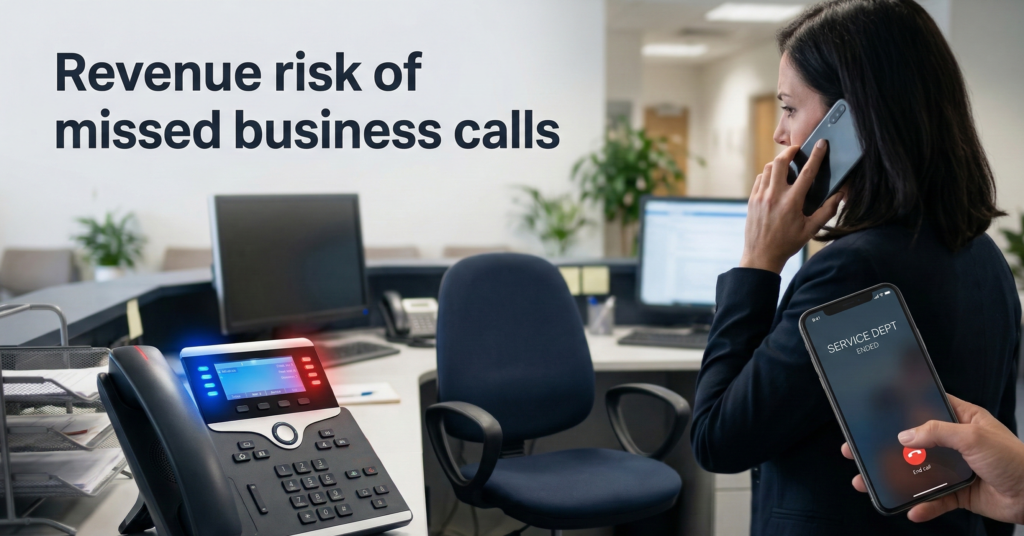
Missed calls quietly drain revenue. A potential client phones your office. It rings during lunch, after hours, or while your front desk is already helping someone else. The caller hangs up after 20 seconds and contacts the next business on Google. Most owners never see that lost opportunity. This is the operational problem that the AI receptionist for business category is designed to solve: consistent call handling, automatic lead capture, and unlimited availability without adding payroll overhead. But the decision isn’t simply “AI vs human.”It’s about cost structure, reliability, risk exposure, and scalability as your business grows. A traditional front desk offers warmth and contextual judgment—but it also introduces availability limits, training overhead, and human variability. AI reception systems flip the model. Instead of staffing coverage hours, they automate call answering, qualification, and routing using voice AI systems that operate continuously. The real question for business owners isn’t whether AI can answer phones. The question is: Where does AI outperform humans operationally—and where should humans still remain in the loop? This guide breaks down the decision through five critical lenses: By the end, you’ll have a clear framework to determine when an AI receptionist becomes operationally superior—and when a human front desk still makes sense. The Real Cost of a Human Front Desk vs AI Receptionist Most cost comparisons between humans and automation are overly simplistic. They compare salary vs software subscription, ignoring the full operational footprint of a front desk role. A realistic breakdown includes five cost layers. Human Front Desk Cost Structure Typical small-business front desk expenses include: Direct costs Operational costs Hidden opportunity costs A typical small-business receptionist can cost: Expense Category Annual Estimate Salary $35k–$50k Payroll taxes & benefits $7k–$15k Hiring / turnover $2k–$5k Coverage gaps / missed leads variable Total realistic cost:$45k–$70k per year. And that still limits call coverage to scheduled hours. AI Receptionist Cost Structure AI reception systems typically operate under a usage or subscription model. Typical expenses include: Annual cost typically ranges: $1,200 – $8,000 depending on volume and capabilities. That gap explains why adoption has accelerated in service-heavy industries like: Key takeaway:The cost difference between human and AI reception often exceeds 10× annually, even before factoring missed-call revenue loss. Availability: The 24/7 Advantage of AI Phone Answering Human receptionists operate within time boundaries. AI does not. This difference seems small operationally but has massive revenue implications. Where Businesses Lose Calls Research and industry call analytics consistently show three major loss windows: Even well-staffed offices cannot guarantee instant response during those moments. Callers behave predictably: If a phone rings longer than ~20–30 seconds, they move on. How AI Receptionists Change the Model Voice AI systems answer instantly and can: All without waiting for staff availability. This transforms phone coverage from “staff coverage hours” to “continuous operational intake.” Example Scenario A plumbing company receives 60% of emergency calls outside business hours. With a traditional front desk: With an AI receptionist: Operational impact: More captured revenue without hiring night staff. Key takeaway:Availability alone can justify AI adoption if your business receives high-value calls outside office hours. Lead Qualification: Where Automation Can Be More Consistent Humans excel at empathy and improvisation. But consistency is not always their strength. Front desk staff often vary in how they: AI reception systems solve this through structured conversational workflows. How AI Lead Qualification Works A voice AI receptionist typically follows a programmed intake path: Every caller receives the same structured process. Example Intake Flow For a legal firm: This ensures that every lead enters the system with usable data. Human receptionists frequently skip or misrecord these details during busy periods. The Operational Advantage Consistency increases lead conversion rates. Sales teams receive: Instead of scribbled notes or incomplete call logs. Platforms like Aivorys are built specifically around this workflow model—combining private AI voice handling with CRM-connected intake systems so every call becomes structured operational data rather than an isolated conversation. Key takeaway:AI improves lead qualification through process consistency, not conversational superiority. Multilingual Communication Without Staffing Complexity Language coverage is one of the most underrated advantages of AI reception. Many businesses operate in regions where multiple languages are common among customers. Hiring multilingual staff introduces several challenges: AI voice systems can handle multilingual interaction by default. Common Language Use Cases Businesses frequently deploy AI receptionists to support: Real Operational Benefit Instead of hiring separate staff for each language, AI systems detect caller language and switch automatically. Example flow: Caller: SpanishSystem: responds in SpanishLead captured and logged in CRM in structured format. Staff can later handle follow-up calls with full context. Key takeaway:Multilingual AI reception eliminates staffing complexity while expanding accessibility to new customers. CRM Integration: Turning Calls into Structured Business Data The biggest operational difference between AI and human receptionists is data capture. Traditional call handling often ends like this: Important details frequently disappear. AI reception systems treat every call as data ingestion for the business. What Gets Captured Automatically Modern AI call handling platforms log: CRM Integration Examples Common integrations include: Once connected, every phone conversation becomes structured CRM activity. Operational Impact Sales and operations teams gain: Human receptionists rarely maintain this level of documentation consistently. Key takeaway:AI reception converts phone calls into structured operational intelligence, not just conversations. Long-Term Scalability: Where Human Models Break Down Human staffing models scale linearly. More calls → more employees. AI reception scales differently. More calls → higher system usage, but no hiring. Human Scaling Model To handle increased call volume: This creates management overhead. AI Scaling Model AI call systems can handle thousands of concurrent interactions. Scaling often requires only: This is particularly valuable for businesses experiencing: Example A real estate brokerage launches a marketing campaign generating 5× call volume. Human desk: AI receptionist: Key takeaway:AI reception scales elastically with demand—human reception requires operational expansion. Decision Framework: When an AI Receptionist Makes Sense The most practical approach is not replacing humans entirely. It’s deciding where automation should handle intake. Use this evaluation checklist. AI Receptionist Fit Score Rate each factor from 1–5.
AI Automation ROI: The Framework CFOs Use to Justify Enterprise Deployment
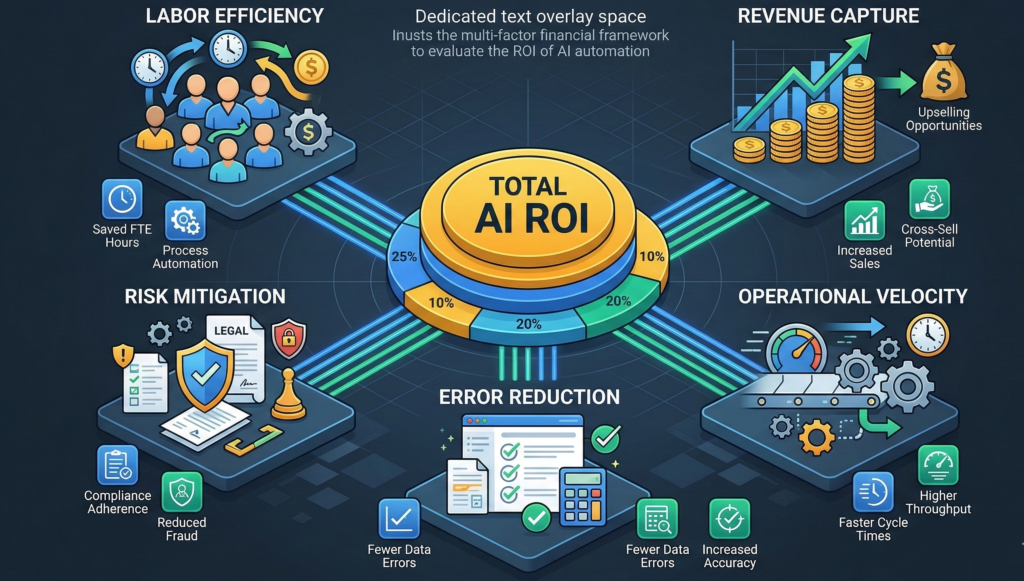
Most AI discussions start in the wrong place. Teams evaluate tools, compare vendors, debate model capabilities, or analyze software pricing. Meanwhile the CFO is asking a very different question: What is the actual financial return of automation across the business? Calculating AI automation ROI is rarely as simple as subtracting software cost from labor savings. In practice, automation affects multiple financial levers simultaneously: When organizations underestimate these dynamics, they undervalue AI investments or delay adoption entirely. Finance leaders who approach automation strategically use a broader evaluation model. Instead of measuring AI as a software purchase, they treat it as an operational multiplier that affects revenue capture, cost structure, and execution speed. This article breaks down the financial framework CFOs use to evaluate automation initiatives, including how to quantify productivity gains, risk mitigation, and operational velocity. By the end, you’ll see why organizations increasingly treat AI infrastructure as a core driver of enterprise efficiency rather than a discretionary technology experiment. Hard ROI vs Soft ROI: The Two Financial Layers of Automation Most ROI discussions collapse automation value into a single number. That approach hides half the impact. Finance teams evaluating AI automation ROI typically separate outcomes into two categories: hard financial return and soft operational return. Hard ROI: Direct Financial Impact Hard ROI represents measurable financial outcomes that directly affect the income statement. Examples include: These metrics translate cleanly into financial models. For example, replacing three call-handling roles with automation could represent: These are the numbers CFOs typically expect to see first. Soft ROI: Operational Efficiency Gains Soft ROI measures improvements that influence business performance indirectly. These include: These benefits often translate into revenue impact over time rather than immediate cost reduction. Common misconception: Many organizations undervalue automation because they only calculate hard ROI. Why Both Matter Hard ROI answers the CFO’s immediate financial question. Soft ROI explains why organizations that automate early often outperform competitors. Financial takeaway: A complete AI automation ROI model must quantify both direct cost savings and operational acceleration. The Hidden Cost of Missed Calls and Delayed Responses One of the most underestimated ROI drivers in automation is lost opportunity. Customer inquiries frequently arrive outside business hours or during peak call volume. When businesses fail to respond quickly, those opportunities vanish. The Economics of Missed Communication Consider a typical service-based organization receiving: That equates to 30 missed opportunities weekly. Even a modest conversion rate can reveal surprising revenue loss. Example: Missed calls could represent: $4,500 in lost revenue weeklyor $234,000 annually This scenario appears across multiple industries: Why Speed Matters Research across customer experience domains consistently shows that response speed directly affects conversion probability. A delayed response can push prospects toward competitors who answer first. Voice AI systems mitigate this risk by ensuring inbound calls are always answered and triaged, even outside standard business hours. Financial takeaway: Revenue capture from improved response coverage is often one of the largest contributors to AI automation ROI. Modeling Productivity Gains from AI Automation Labor efficiency remains one of the clearest financial benefits of automation. However, many organizations miscalculate productivity gains by assuming a one-to-one replacement model. Automation rarely eliminates entire roles. Instead, it removes high-volume repetitive tasks, allowing employees to focus on higher-value work. The Automation Productivity Multiplier A practical modeling approach evaluates how automation shifts time allocation. Example scenario for a service operations team: Task Time Spent Automation Impact Phone intake 30% Automated Appointment scheduling 20% Automated Data entry 15% Reduced Customer follow-up 15% Assisted Complex case handling 20% Human With automation handling routine tasks, the same team can support significantly more customers without increasing headcount. Throughput Expansion Rather than reducing staff, many organizations experience: This leads to operational scalability without proportional hiring. Workforce Reallocation Another advantage appears when staff are reassigned from administrative tasks to revenue-generating work. Examples include: Financial takeaway: Productivity modeling should measure increased operational throughput, not just reduced headcount. Risk Mitigation and Error Reduction as ROI Drivers Automation also produces financial value by reducing operational mistakes. Errors may appear small in isolation but accumulate significant cost across large organizations. Common Operational Errors Manual workflows frequently introduce issues such as: Each of these errors carries hidden costs. Examples include: Automation as a Governance Layer AI systems can enforce consistent workflows. Instead of relying on human memory or manual processes, automation can: This is particularly valuable in regulated industries where documentation and traceability matter. Platforms like Aivorys (https://aivorys.com) are designed with this operational governance model in mind, connecting voice automation, workflow triggers, and CRM systems so customer interactions consistently follow defined processes. Financial takeaway: Error reduction and compliance safeguards reduce operational risk costs that traditional ROI models often ignore. Calculating the True Lifecycle Cost of AI Deployment ROI cannot be evaluated without understanding the full cost structure of automation initiatives. Focusing only on subscription fees produces misleading analysis. Finance teams typically model total lifecycle cost across several categories. 1. Implementation Costs Initial deployment often includes: These costs are usually one-time investments. 2. Infrastructure and Platform Fees Recurring costs may include: These costs scale with usage. 3. Maintenance and Optimization Automation systems require ongoing refinement. Examples include: Organizations should account for these operational costs in long-term projections. 4. Governance and Security Enterprises may also invest in: Financial takeaway: CFOs evaluate AI automation ROI across a multi-year lifecycle rather than a single-year cost comparison. The CFO’s AI Automation ROI Framework To standardize evaluation, finance leaders often apply a structured model. The Enterprise AI ROI Scoring Framework Evaluate each category on estimated annual impact. ROI Category Key Question Labor Efficiency How much staff time can automation reclaim? Revenue Capture How many opportunities are currently missed due to response delays? Throughput Growth How many more customers can the team serve with automation? Error Reduction What operational mistakes can be prevented? Risk Mitigation Does automation improve documentation and compliance controls? Operational Velocity How much faster can workflows execute? Interpreting the Results Organizations typically see ROI emerge through three mechanisms: [INTERNAL LINK: Enterprise AI Deployment Strategy] Strategic takeaway: AI automation ROI emerges
Why Voice AI Is Replacing Traditional Phone Systems in Enterprise Operations
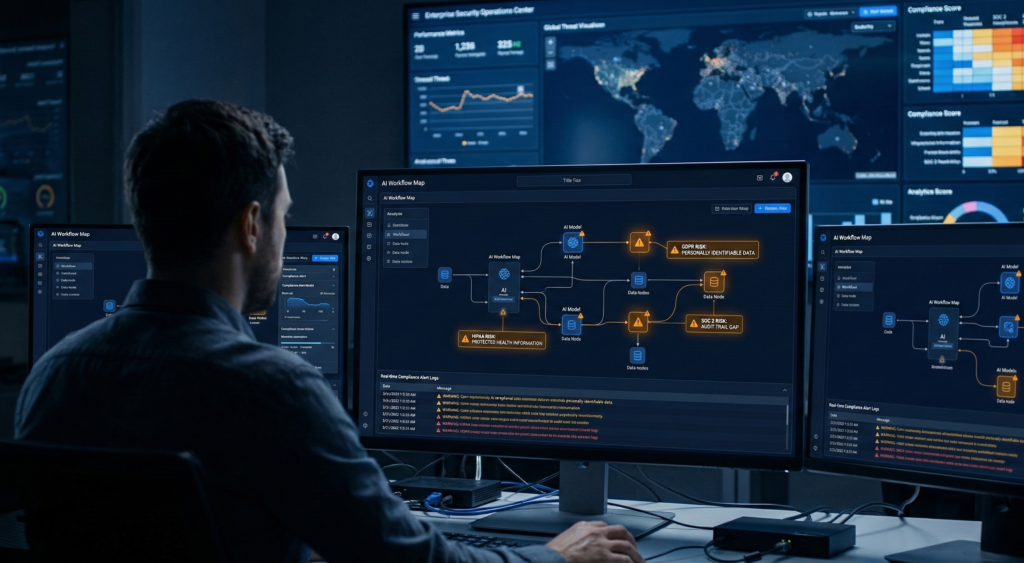
Enterprise phone systems were designed for a different era. An era where calls followed predictable patterns, customer inquiries were simple, and scaling support meant hiring more staff. That model is breaking. Modern organizations handle thousands of conversations across sales inquiries, appointment scheduling, service requests, and internal coordination. Traditional PBX systems and phone trees simply route calls from point A to point B. They don’t understand intent. They don’t capture data. And they definitely don’t improve over time. Voice AI for enterprise changes the role of the phone system entirely. Instead of acting as a passive switchboard, it becomes an intelligent layer that understands conversations, routes requests dynamically, captures operational data, and automates routine interactions. For operations leaders, this shift is less about replacing phones and more about upgrading the entire communication infrastructure. The result is a system that can scale customer communication, reduce operational friction, and transform every call into actionable business intelligence. To understand why enterprises are making the transition, it helps to start with the core limitation of legacy systems. The Structural Limits of Traditional Enterprise Phone Systems Legacy phone systems are built on rigid logic. Press 1 for sales.Press 2 for support.Press 3 for billing. These phone trees were originally designed to manage call volume with minimal staffing. But in practice, they create three persistent operational problems. 1. Phone Trees Don’t Understand Intent A caller navigating a phone tree often has to guess which option matches their issue. A new prospect calling about pricing might press “sales.”A current client requesting a contract update might also press “sales.”A technical question might land in the wrong department entirely. The system has no ability to interpret what the caller actually wants. Every misrouted call adds friction, delays resolution, and wastes employee time. 2. Static Systems Cannot Adapt to Demand Traditional PBX systems route calls based on predefined rules. They cannot adjust routing based on: This rigidity creates bottlenecks during high-volume periods. 3. Conversations Produce No Operational Intelligence A conventional phone system captures only surface-level metrics: But it cannot answer questions operations leaders actually care about: In other words, the phone system generates activity but almost no insight. Voice AI changes that architecture. Operational takeaway: If your phone system cannot understand conversations or capture structured data from them, it functions as infrastructure rather than intelligence. How Voice AI for Enterprise Actually Works Voice AI systems operate very differently from traditional telephony platforms. Instead of routing calls through static menus, they process conversations in real time. The architecture typically includes five core layers. 1. Speech Recognition The system converts spoken language into text with low latency. Modern enterprise systems can transcribe speech within milliseconds. This allows downstream systems to process meaning as the conversation unfolds. 2. Natural Language Understanding The next layer analyzes the transcript to detect: This is where conversational AI determines what the caller actually needs. 3. Decision and Workflow Engine Once intent is detected, the system triggers actions such as: This decision layer is where enterprise automation begins. 4. Response Generation The system responds through natural speech using voice synthesis. Unlike static scripts, responses can adapt dynamically based on conversation context. 5. Analytics and Data Capture Every interaction becomes structured operational data: This information feeds dashboards that reveal patterns across thousands of conversations. Platforms like Aivorys (https://aivorys.com) are built for this operational layer. They combine private AI models, voice automation, and workflow integrations so enterprise teams can deploy conversational infrastructure without exposing proprietary data to public AI systems. Operational takeaway: Voice AI systems turn phone communication into a programmable workflow layer rather than a static routing tool. Real-Time Intent Detection and Intelligent Call Routing One of the most powerful capabilities of conversational AI is real-time intent detection. Instead of asking callers to navigate menus, the system simply asks: “How can I help you today?” The caller might say: Within seconds, the system identifies the request and determines the correct action. How AI Routing Differs from Phone Trees Legacy routing logic: Caller → presses button → department transfer AI routing logic: Caller speaks → intent detected → workflow decision → action This allows organizations to implement far more sophisticated routing policies. For example: Lead prioritization High-value prospects can automatically route to senior sales staff. Customer recognition Returning customers can bypass intake questions. Urgency escalation Support calls flagged as urgent can skip queues. Automated resolution Routine questions can be answered instantly without human involvement. Mini Scenario A healthcare provider receives thousands of inbound calls per week. With a traditional system: With voice AI: Operational takeaway: Intelligent routing reduces both call handling time and staffing requirements while improving caller experience. The Staffing and Cost Dynamics Behind AI Phone Systems Phone-based operations are expensive. Every call handled by a human agent requires: As call volume grows, staffing grows alongside it. Voice AI fundamentally changes that cost structure. Where Enterprises See Immediate Savings 1. Automated first-line intake Many inbound calls involve routine requests: Voice AI handles these automatically. 2. Reduced call transfers Intent detection routes calls accurately the first time. Fewer transfers mean faster resolution and lower handling costs. 3. 24/7 availability without staffing expansion Organizations can provide round-the-clock call handling without night shifts. A Simple ROI Model Operations teams often evaluate AI phone systems using a straightforward framework. Annual Call Volume Total inbound conversations handled by staff. Average Handling Time Minutes per call including transfers and notes. Fully Loaded Labor Cost Salary plus benefits and overhead. Automation Rate Percentage of calls handled entirely by voice AI. Example scenario: This reduces approximately 6,600 labor hours annually. For large enterprises, the operational savings become substantial. Operational takeaway: The ROI of conversational AI comes from automation of routine interactions, not replacing complex human conversations. Integrating Voice AI with CRM and Operational Workflows A phone system by itself provides limited value. The real transformation occurs when voice AI connects directly to operational systems. This is where enterprise automation becomes tangible. CRM Integration Voice AI can read and write data directly to CRM systems. Examples include: This